
How to Read an Automated Buy Report
Handing your buying to software doesn't end your involvement — it compresses it. An hour of tabs, price checks, and mental arithmetic becomes one email over coffee. But only if you know which numbers are a glance and which are a summons. Here's the two-minute read, line by line.
What a buy report is for
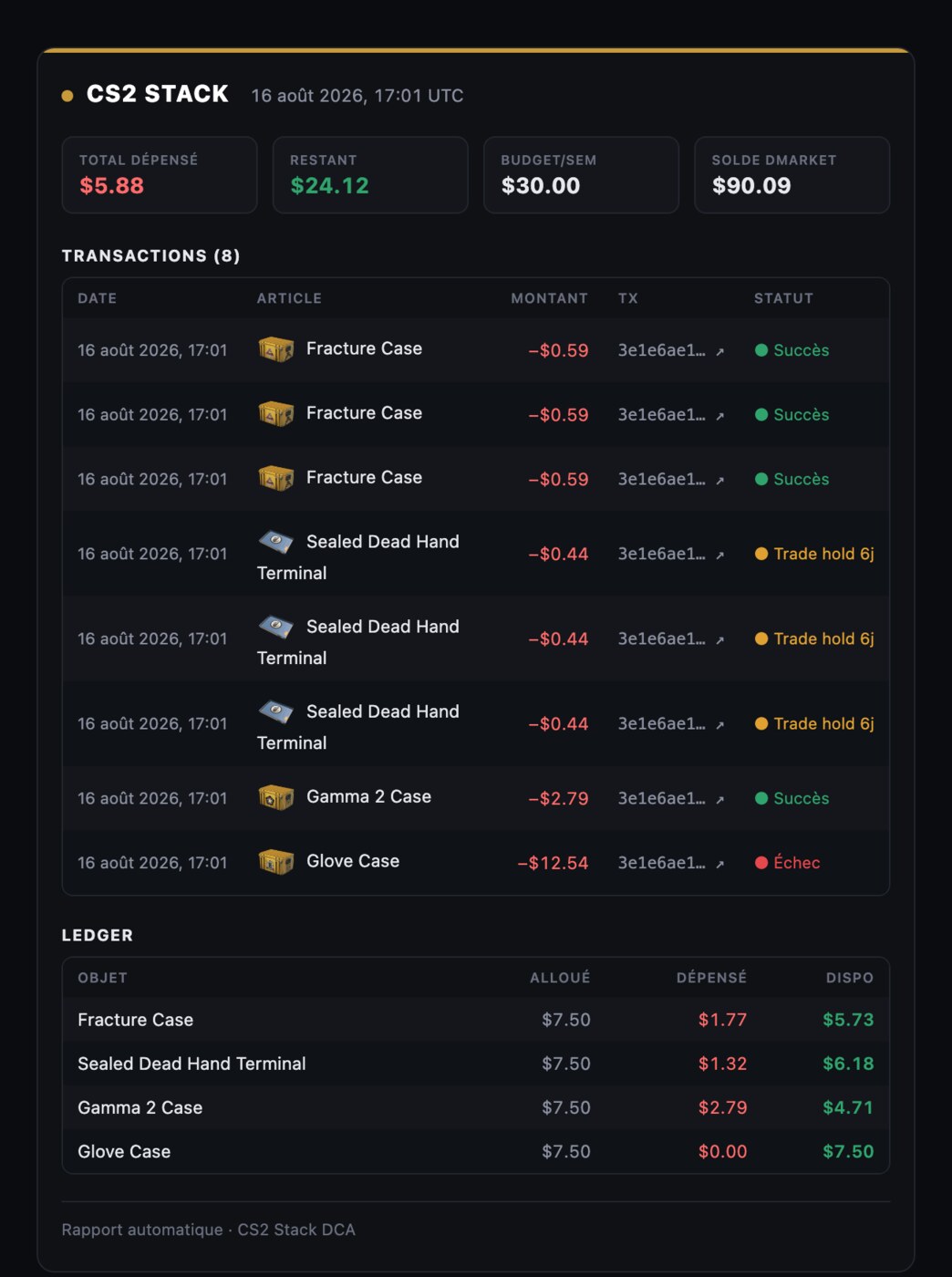
An automated buyer that doesn't report is a black box with your money in it. The morning report is the contract made visible: here is what your plan said, here is what actually happened, here is why any gap exists. It's one of the three emails a buying bot should send (the others being performance summaries and balance alerts), and it's the one you'll read daily — so reading it efficiently matters. The goal isn't auditing every line every day; it's knowing the difference between green-light patterns you skim past and the three or four signals that require a human.
The anatomy, section by section
1. Spent vs budget
The headline: "spent $19.47 of $20.00" or similar. This is a glance, not a study. What you're confirming is shape, not digits — spend at-or-under budget, in the normal range. Two shapes deserve a second look. Spend well under budget for several consecutive days means fills are failing somewhere: caps skipping, a venue out of stock, a starved balance. Spend at exactly the cap every single day is fine if your plan is sized that way, but if it used to leave slack and suddenly doesn't, prices moved — worth knowing. The budget cap itself is your outer wall; the report is how you watch it hold without ever testing it personally.
2. The fills
Each executed buy: item, venue, price, currency. Skim for two things. First, venue mix — a healthy multi-market setup routes each buy to whichever of your venues was cheaper that morning, so seeing both names appear over a week is the system working; one venue winning 100% for weeks might mean the other's pricing feed or your balance there needs attention. Second, prices drifting near your caps: fills consistently within a few percent of a max-price line mean that line is about to start skipping, and you'd rather decide now whether that's a spike to sit out or a repricing to accept. For any fill that looks odd, the full anatomy of a single purchase — quote, comparison, execution, ledger entry — is the drill-down.
3. Skips — the most informative section
A good report explains every intended buy that didn't happen and why: over cap, no listings, insufficient balance, validation failure. One-off skips are weather. Repeated skips on the same line are the report's single most valuable signal, because each cause has a different correct response:
- Over cap, repeatedly: the market repriced or is spiking. Decide deliberately — raise the cap, wait it out, or retire the line. Don't let a stale cap silently turn a line dead.
- No listings, repeatedly: thin supply on your venues, or a name problem — the Gamma 3 class of error, if it somehow got past validation.
- Insufficient balance: the bot is starving. This should also have arrived as a dedicated balance alert, but the skip line is your backstop. Top up; a starving bot on a daily schedule misses fills you don't get back.
4. Balances
Remaining funds per marketplace, ideally with a days-of-runway estimate at your current burn. The glance rule: runway above a week, move on; below, top up today. Cash marketplaces debit prepaid balances, so this number is the system's fuel gauge — the single most common way otherwise-healthy automation quietly stops is an empty tank nobody looked at.
5. Holds and deliveries
Bought is not delivered. DMarket purchases have been observed carrying trade locks of roughly two to seven days before withdrawal, while SkinBaron delivers via direct Steam trade offers — so a normal report shows a rolling pipeline of items in transit. This section is a glance ("pipeline moving") unless something has sat beyond the normal window, which is your cue to check the venue. The mechanics are covered in trade holds and withdrawal tracking; the report's job is just to keep the pipeline visible so "where are my cases?" never becomes a mystery.
The two-minute protocol
In practice: read the spent line (five seconds). Scan skips for repeats (thirty seconds — usually none). Check balance runway (five seconds). Skim fills for venue mix and near-cap prices (thirty seconds). Glance at the holds pipeline (ten seconds). Done. On perhaps nine mornings out of ten, nothing requires you at all — which is the point. You've replaced an hour of manual dashboard-hopping with a scan, and you've done it without giving up oversight, because the one morning in ten that does need a human announces itself in the skip and balance sections.
Two habits complete the loop. First, act on the report's signals the same day — a red balance or a three-day skip streak costs more each morning it's ignored. Second, remember the email is a summary, not the source of truth: every number in it should trace back to an append-only purchase ledger you can audit whenever a line looks off. Report for the daily glance, ledger for the deep look. If your tool offers the first without the second, you have a newsletter, not an audit trail.
What the report can't tell you
Honest limits: the buy report tells you your plan executed, not that your plan is good. It will faithfully report perfect execution of a case whose thesis died last month. Strategy review — is this the right list, the right budget, the right caps — is a separate, slower loop, monthly or quarterly, with the ledger and your own judgment. The daily report keeps the machine honest. Keeping the plan honest stays your job, and no email replaces it.