
Float Checker Tools in 2026: Beyond the Original CSFloat
Disclosure first: this is cs2stack's own blog, and cs2stack doesn't do float filtering at all — our autobuy works on price rules, not wear values. That makes this an unusually comfortable roundup to write: every tool below complements what we do rather than competes with it, so we have no reason to shade the comparison. Here is every practical way to read a float before you buy, and when each one fits.
Why float verification comes before every serious buy
A float value is a decimal between 0 and 1 baked into a skin at creation, and it never changes. It decides the wear label, how the finish actually renders, and — at the extremes — the price. Two Factory New copies of the same skin can differ meaningfully in both looks and resale value because one sits at 0.003 and the other at 0.069. We've covered the mechanics in depth in our float values explainer; the short version is that the market prices the decimal, not the wear label.
That's why checking the float is step zero of any purchase above pocket change. A listing that looks cheap for its wear tier is usually cheap because of its float — a 0.14 "Field-Tested" that renders like Well-Worn, or a Minimal Wear sitting a hair from the FT boundary. Skip verification and you're the person the float tax gets paid by, not collected from. The same logic extends to pattern seeds: on Case Hardened, Fade or Doppler skins, the seed can matter more than the float, and the better checkers surface both.
CSFloat's inspect tooling: where the category started
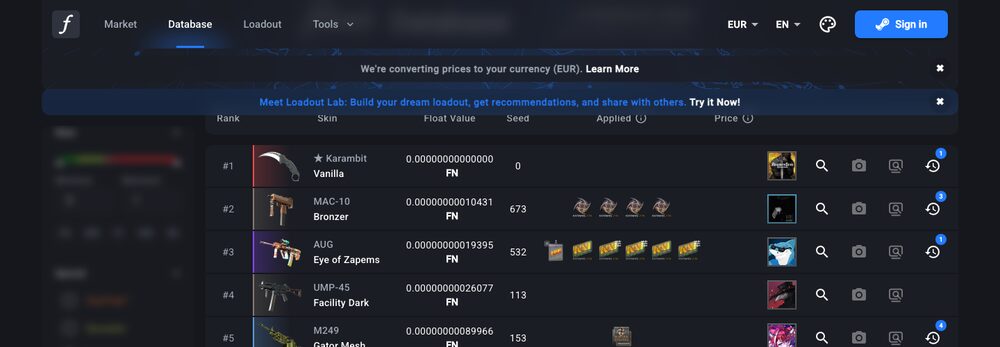
CSFloat (originally CSGOFloat) built the tool this whole category is named after: paste an inspect link, get back the exact float, paint seed, paint index and — for many skins — a float rank showing where that item sits among all copies the service has ever indexed. Per its public pages it remains free to use in its basic form, and it's the reference implementation most traders mean when they say "float check it."
The rank feature deserves special mention. Knowing a float is 0.0009 is useful; knowing it's the #4 lowest ever recorded for that skin is a different tier of information, because collectors pay for leaderboard positions, not just low numbers. Treat rank data with the standard caveat that it only covers items the database has seen — but as public datasets go, CSFloat's is the deepest we're aware of.
CSFloat also grew a full peer-to-peer marketplace around that data, which leads to the next category.
Marketplace-native float display
The friction-free version of float checking is a venue that shows the data on every listing by default. CSFloat's own market naturally does — float, seed and rank are first-class listing attributes there, and you can filter and order by them. Several other third-party venues display float values and float bars on listings too, with varying depth; specifics differ by site and change over time, so check the listing page of whichever venue you use rather than assuming.
The practical rule: if you're buying on a marketplace that already shows verified float data inline, a separate checker is belt-and-braces. If you're buying anywhere that shows only the wear label — the Steam Community Market is the big one — external verification isn't optional.
Overlay extensions: float data where you already browse
Browser extensions close the Steam gap. BetterFloat, per its public pages, injects reference prices and listing enhancements directly into supported marketplace pages, and SkinSniper overlays third-party prices onto Steam listings; several extensions in this family also surface float and seed details in-page, though exactly which data appears on which site varies by extension and version — check the current feature list before relying on it. We've reviewed the two we know best separately: BetterFloat and SkinSniper.
The trade-off with any extension is trust: it reads the pages you browse, and marketplace pages include your session. Install from official stores only, and read the permissions — reasonable hygiene we'd apply to our own tool too.
APIs, for people building their own pipeline
If you're automating — scanning listings at volume, building a pattern-hunting spreadsheet, feeding a bot — you'll want float data by API rather than by paste. CSFloat publicly documents an API around its inspect and market data; other services expose endpoints of their own. We won't quote rate limits or pricing here because those are exactly the details that drift: read the current docs before you architect around any of them. The general shape is stable, though — inspect-link in, float/seed/rank out — and it's what powers most of the deal scanners and sniping tools built on top.
Which one do you actually need?
- Occasional buyer, one item at a time: CSFloat's free inspect tool covers you completely. Paste, read, decide.
- Regular Steam Market browser: an overlay extension pays for its install time in a week, because it removes the tab-switch on every listing you consider.
- Pattern or low-float hunter: you want rank data and seed display — CSFloat's database plus a venue that filters by float, and probably alerts on top.
- Builder: the APIs, with current docs open.
And one honest note about us. cs2stack's autobuy buys cases and liquid items on price rules — daily budget, per-item ceiling, hard cap — across DMarket and SkinBaron. Cases don't have floats, and our engine doesn't filter by wear even on items that do. If your strategy lives in floats and seeds, the tools above are your stack and we are not; if you run a DCA-style accumulation alongside your float hunting, the two coexist without overlap. Either way, float verification belongs in how you value a skin before any money moves.