
API Keys and Skin Tools: A Security Primer
An API key is a password that never gets a second factor, never sees a login screen, and works from anywhere on earth. Hand one to a skin tool and you've handed over whatever that key can do — which, for marketplace keys, usually includes spending your balance. This isn't a reason to avoid automation. It's a reason to handle keys like the money they are.
What a marketplace key actually is
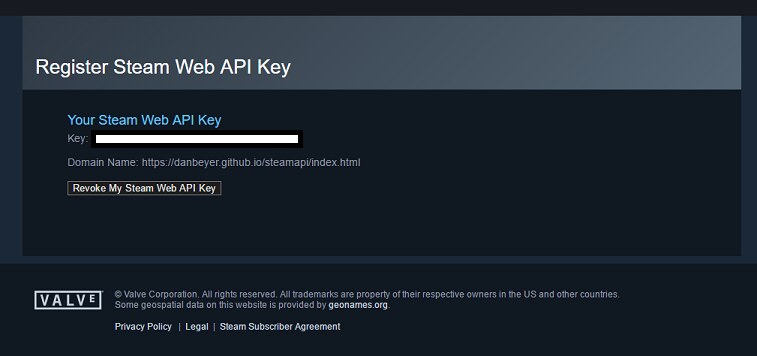
When you generate an API key on a marketplace, you're minting a credential that lets software act as you: read your balance, list your inventory, and — depending on the key's permissions — place orders with your money. No confirmation dialog, no email challenge. That's the entire point; it's what makes automated buying possible at all. It's also why the key deserves more care than most people give the account password it bypasses.
The good news: key hygiene is a small set of habits, not a lifestyle. Five of them cover essentially everything.
Habit 1: least privilege
Grant a tool only what its job requires. A buy-side tool needs to read prices and place purchase orders; it does not need permission to sell your inventory, change your payout details, or manage your account. Where a marketplace offers scoped or permissioned keys, use the narrowest scope that works. Where it doesn't, that's worth factoring into how much balance you keep at that venue — counterparty exposure is a real line item, as covered in marketplace risk.
The same principle applies to tool design. cs2stack is deliberately buy-side only — there is no selling code — so even a fully compromised deployment can't liquidate an inventory. When you evaluate any tool, ask the structural version of the question: not "will it misuse access?" but "can it?" The distinction is the theme of what a skin bot should never be allowed to do.
Habit 2: store keys like secrets, because they are
The failure pattern here is mundane: keys pasted into config files that get committed to a public repo, shared in a Discord screenshot, or left in a notes app. The rules that prevent it:
- Keys live in environment variables or a secrets manager — never hard-coded in files that travel.
- If a config file must reference a key, it references the variable name, not the value. A public audit ledger like cs2stack's git-committed purchase log contains prices and items, never credentials — transparency and secrecy aren't in conflict if you separate them on purpose (see open-ledger investing).
- Screenshots and screen-shares are leak vectors. Blur or regenerate anything that appeared on stream.
Habit 3: rotate, and know how to revoke fast
Rotation — replacing a key with a fresh one on a schedule — limits how long a silent leak stays exploitable. Quarterly is a reasonable cadence for most people; immediately is the cadence after any suspected exposure. More important than the schedule is having practiced the motion: know where the revoke button is on each marketplace before the day you need it at 2 a.m. Revocation is the API-key equivalent of a kill switch, and like all kill switches it belongs to the safety toolkit described in safety engineering for buying bots.
Habit 4: cap the blast radius with money limits
Even a perfectly stored key sits upstream of software that can have bugs. The mitigation isn't more cryptography — it's less money at stake. Keep marketplace balances sized to your actual buying cadence rather than parked in bulk; a $20/day strategy doesn't need $2,000 sitting at a venue. Run tools that enforce their own spending ceilings — per-item caps, daily budgets, and ideally a hard cap that config can't override, like cs2stack's $500 line (the full model is in budget caps). Between a small balance and a hard cap, the worst day a leaked key can give you gets a known, survivable price tag.
Habit 5: recognize the phishing patterns
Most skin-scene compromises aren't exotic hacks; they're social. The recurring shapes: fake trading sites that ask you to "verify" with credentials or a key; Discord DMs offering tools, jobs, or free items that route you to a lookalike login; browser extensions requesting permissions no price-checker needs; and "support agents" who initiate contact. The patterns are well-documented in the scams that empty inventories and the scam patterns every investor meets. The one-line defense: legitimate tools never need your account password, and nobody legitimate ever asks you to paste a key in a chat.
Questions to ask any tool before giving it a key
Where does my key live — my machine, or your servers? What permissions does the tool actually exercise? What can it never do by construction (selling, withdrawing, changing account settings)? Are there spending caps, and is any of them hard-coded? And is there an audit trail I can check against my marketplace history? A tool with good answers will volunteer them; evasiveness on any of these is itself an answer. Automation should reduce the number of things you have to trust blindly — starting with the tool itself.
Finally, put a date on your own audit. Once a quarter, list every place a key of yours currently lives — tools, machines, cloud jobs — and kill the ones you can't justify in one sentence. Keys accumulate the way browser tabs do: silently, and mostly for things you stopped using months ago. The whole review takes fifteen minutes, and it's the difference between key hygiene as a policy and key hygiene as a fact. Security for skin tooling isn't a project; it's five habits and a calendar reminder.